

GPT-5 guide for business: Learn what's new, strengths vs weaknesses, 4 practical use cases, and tips to get better results for your team and workflows.
Expectations for GPT-5 were high, and its release in August 2025 sparked plenty of debate. But the real question is:
How can GPT-5 help you run and grow your business?
In this article, we’ll skip the hype and explain:
- What GPT-5 is and how it differs from earlier models
- Strengths and weaknesses of GPT-5 for everyday business use
- Practical tips to get better results
What is GPT-5?
GPT-5 is OpenAI’s newest model, released in August 2025. It brings together the best of each previous model in one unified powerhouse.
Within the GPT-5 model drop-down, there are different options. On the Teams plan, you can choose from:
- Auto — The default setting, this is where you allow GPT-5 to choose its mode according to your prompt.
- Instant — Immediate answers, little thinking time.
- Thinking mini — Quick thinking for simpler queries.
- Thinking — Takes longer, goes through more detailed thinking process before answering.
- Pro — Research-grade intelligence, designed for scientific purposes.
- Legacy models — Access to legacy models including GPT-4o, 4.1, and o3.
To adjust the way GPT-5 responds, you can switch the model or include an instruction in your prompt like telling it to “think hard” if you want thoroughly researched answers.
Overall, GPT-5 is faster, more accurate, and better at structured reasoning than any model before it. That means fewer frustrating errors, smoother back-and-forth conversations, and stronger performance in research, reporting, and strategy.
Some highlights:
- Reads text and images together – You can feed it a slide deck, a chart, or even a sketch, and it will combine visual and written information to give you insights.
- Sharper reasoning – GPT-5 scores higher on complex problem-solving benchmarks, including medical and technical domains (arXiv).
- Fewer hallucinations – It’s less likely to make things up compared to GPT-4, though you still need to double-check important outputs (TechRadar).
- Efficiency gains – It responds faster, especially useful if you’re processing long documents or relying on it in real-time workflows (Clarifai).
How these capabilities can be useful in your business:
- Handles complex material – GPT-5 can cut through dense documents, so you could upload a compliance guide and instantly see only the sections that affect your business.
- Sees the big picture – It connects what it reads and what it sees. Ask it to compare your product mockup against a competitor’s screenshots and spot where you stand out.
- Great for structured planning – It’s good at reasoning in steps and sequences, so you could generate a 90-day go-to-market plan with milestones you can hand to your team.
- More careful with sensitive topics – Safer wording, may be better at writing sensitive content and avoiding harmful topics.
- Consistent performance across tasks – From market analysis to summarizing research, it delivers more reliable results than GPT-4. If you ask it to pull industry stats, summarize competitor strategies, and draft an investor update; it can do it all without losing accuracy.
Where GPT-5 still struggles
No tool is perfect, so here are some things to watch for:
- Fact-checking is still on you – It’s better, but not flawless, so don’t trust everything it says blindly.
- Visual precision is limited – Good at big-picture analysis, but it’s not great at spotting tiny spreadsheet errors.
- Neutral by default – Some complain that its writing is very dry. If you want bold, personality-driven copy, you’ll need to steer it with clear prompts.
- Memory gaps – It doesn’t always remember your context between sessions, but using Projects helps.
Four ways to use GPT-5 for your business today
1. Analyze a competitor’s slide deck for weak spots
Upload their investor presentation or sales pitch, and GPT-5 can highlight where they’re overselling, under-explaining, or leaving gaps you could exploit. It might flag that they boast about growth but don’t show churn rates, or that their pricing model looks vulnerable to a lower-cost alternative.
2. Turn an analytics dashboard screenshot into actionable insights
Instead of staring at numbers, paste in a screenshot of your Google Analytics or HubSpot dashboard. GPT-5 can point out trends like “organic traffic dipped after the last product update” or “email conversions are strong on Tuesdays—double down on that.” It shifts raw data into decisions you can act on.
3. Summarize financial reports or customer surveys in plain language
Drop in a 40-page quarterly report or a CSV full of survey results, and GPT-5 will pull out the key story: “Revenue rose 12% this quarter, mainly from repeat customers, but support response times are frustrating your highest-value clients.” You’ll have clear insights to share with your team or investors.
4. Draft customer emails, reports, or even scripts for AI agents inside your workflows
Whether it’s personalized onboarding emails, a weekly progress update for clients, or the conversation flow for a chatbot, GPT-5 can generate polished drafts in your brand’s voice. You still get the final say, but the time saved lets you focus on strategy instead of first drafts.
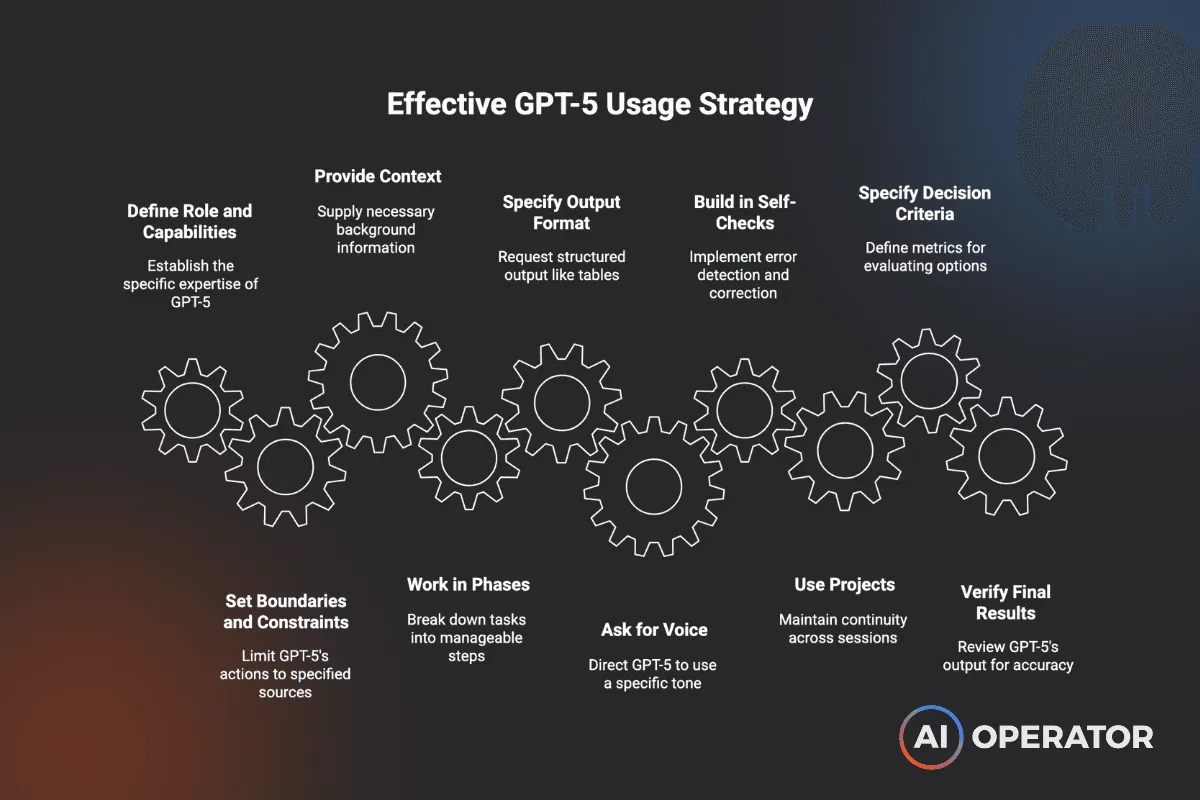
Tips for using GPT-5 effectively
- Define its role and capabilities.
- Set boundaries and constraints.
- Give plenty of context.
- Work in phases
- Specify the output format.
- Ask for your voice on purpose.
- Build in self-checks.
- Use Projects for continuity.
- Specify decision criteria.
- Always verify final results.
Move faster with GPT-5
When GPT-5 is used wisely, it can:
- Cut research time from hours to minutes
- Automate repetitive reporting and documentation
- Accelerate sales and marketing content creation
- Free your team to focus on vision, customers, and growth
Founders who build clear processes and workflows around GPT-5 and use it with intention will move faster than those who just chat with it.
To drive business productivity and profit with GPT-5 and other AI tools, book a call with us and discover our fully customized AI-First Mindset Training Program.
More Articles
How to Build an AI Voice Agent That Qualifies Leads and Books Meetings Automatically
A step-by-step breakdown of how we built Athena, an AI voice agent for a travel agency, using JustCall, Zapier, ActiveCampaign, and Calendly. Lead response time reduced from 24–48 hours to five minutes.
Context Architecture: The AI Skill That's Replacing Prompt Engineering
Prompt engineering used to matter. Now the models are smart enough that plain English works. The real unlock is context architecture — giving AI permanent access to your business context so every output builds on the last.
Your Sales Team Spends 70% of Their Time on Admin Work—Here's What Changes That
Sales reps spend less than a third of their time actually selling. The rest disappears into admin. Here's how AI-native CRMs are changing that—and which tools are leading the shift.