
ChatGPT's project-only memory explained: Setup guide, business use cases, and best practices. Early users report 40% workflow efficiency gains.
If you're tired of re-explaining context to ChatGPT every time you switch projects, this update could save you hours each week.
OpenAI released project-only memory, a feature that keeps ChatGPT's context isolated within specific projects. Early users report cutting AI workflow time by roughly 40%!
Here's what that means for your business.
What is Project-Only Memory?
Project-only memory confines ChatGPT's remembered context to a single project workspace. When you're working in Project A, the AI only draws from conversations and files within that project—it won't reference anything from Project B or your other workspaces.
This solves a major problem: cross-client data bleed and the need to constantly re-teach the AI your context every time you switch between projects.
Why this matters
Many businesses handle multiple clients, confidential data, or different product lines. Before this feature, ChatGPT would mix context from all your projects, leading to:
- Accidentally referencing the wrong client's information
- Constantly re-explaining project details
- Unpredictable responses based on mixed context
- Compliance concerns for regulated industries
Project-“Only Memory creates clean boundaries between your work, making AI interactions predictable and easier to audit.
Who should care
This feature is particularly valuable for:
- Consultants and agencies managing multiple client accounts
- Healthcare and finance teams handling sensitive data
- Product managers working on different initiatives
- SMB owners juggling various business areas
How to set it up
Here's the step-by-step process, including the one mistake most people make:
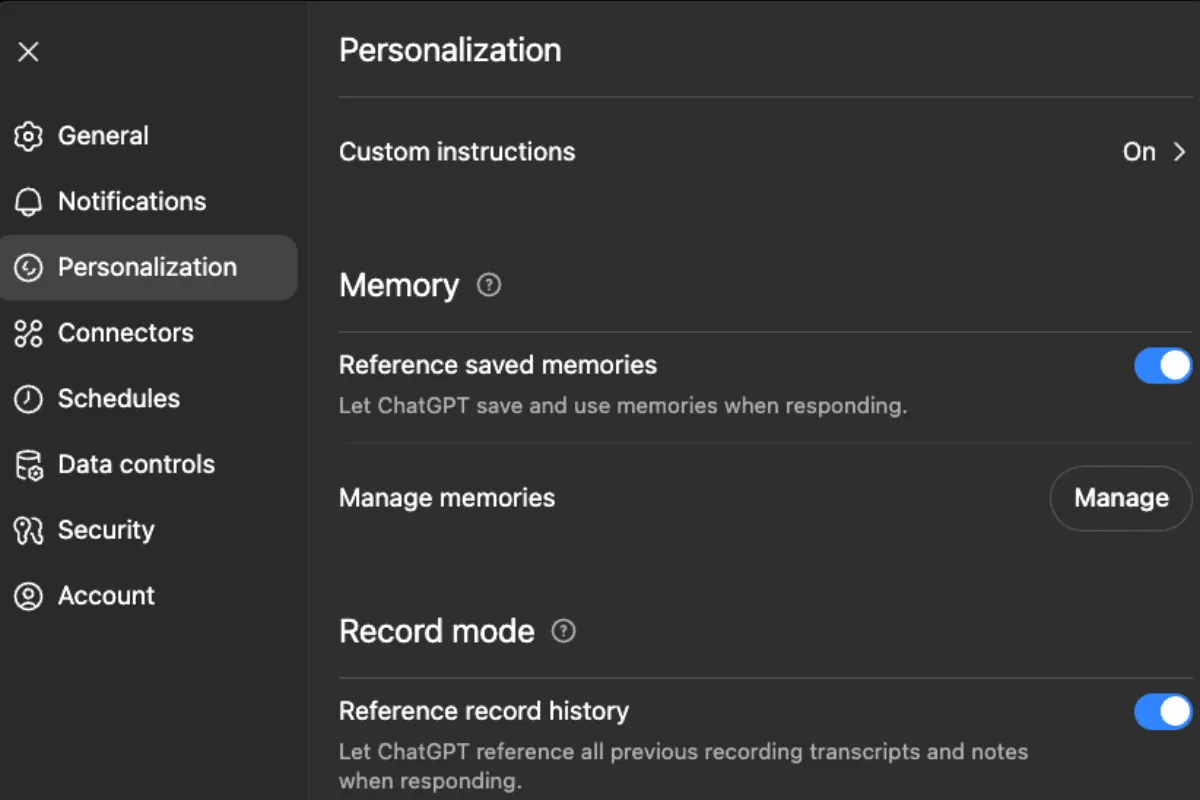
Step 1: Verify prerequisites
- Go to Settings → Personalization and confirm "Reference saved memory" is enabled
- For team accounts, ensure your admin has enabled workspace-level memory
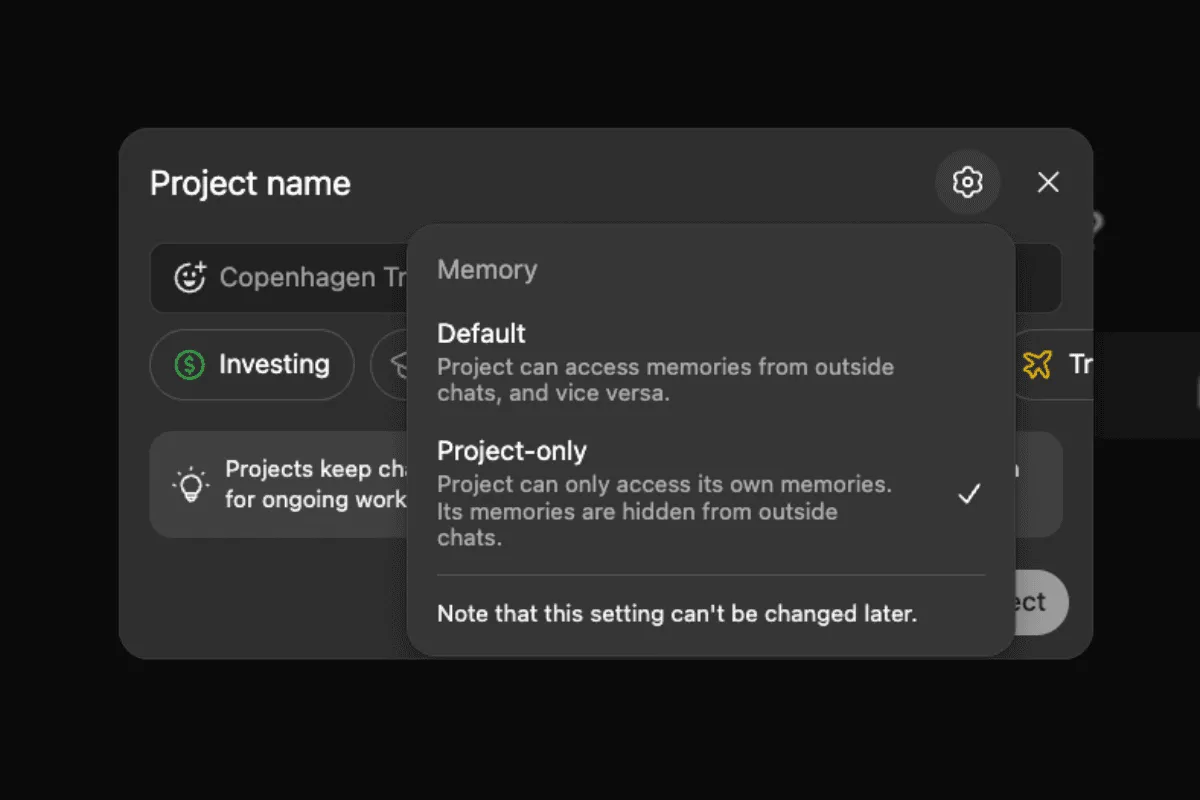
Step 2: Create a new project (critical!)
The biggest gotcha: You must create a new project to enable project-only memory. You cannot turn this on for existing projects.
- Create a new project from the left menu
- Click "More options" (gear icon) during creation
- Change memory setting from default to "project only"
- Add a clear, descriptive name
Step 3: Upload your context
Add the files and instructions you want ChatGPT to persistently remember:
- Brand guidelines
- Client documentation
- Meeting notes
- Templates
- Custom instructions for tone and approach
Step 4: Test and validate
- Ask project-specific questions to confirm responses reflect only uploaded content
- Switch to another project and verify no cross-contamination
This ensures the isolation is working properly.
Step 5: Plan your migration
For existing high-value projects:
- Identify which current projects need isolation
- Recreate them as new projects with project-only memory enabled
- Re-upload necessary files and context
Practical business applications
Best practices
Naming Convention: Use clear prefixes like "Client — Acme Corp" or "Product — Healthcare App"
File Organization: Keep sensitive documents in clearly labeled folders within each project
Team Guidelines:
- Assign memory owners for each project
- Schedule regular memory audits
- Define what information should be uploaded
Governance:
- Establish retention policies
- Ensure proper contracts (DPAs/BAAs) are in place
- Create review processes for sensitive data
Current limitations
- Available on ChatGPT website and Windows app (mobile support coming)
- Cannot retrofit existing projects
- No detailed retention or encryption specs published yet
Measuring success
Track these metrics to prove ROI:
- Time saved on repetitive context explanations
- Reduction in project mix-ups
- Faster task completion
- Improved consistency in outputs
Early adopters report 30-50% reductions in repetitive context work, with many citing around 40% improvement in workflow efficiency.
Getting started this week
- Pick your highest-impact client or project for a pilot
- Create one new project with project-only memory enabled
- Upload essential context and test isolation
- Measure time savings over 30 days
- Scale based on results
The bottom line
This is the first time ChatGPT can truly sandbox context by project. This addresses the cross-client contamination that has frustrated business users since day one.
The setup requires some planning, especially migrating existing projects, but the payoff is significant: predictable AI responses, better data isolation, and substantial time savings on repetitive context work.
The future belongs to businesses that think AI-First about their workflows. Project-only memory is a tool that makes that future more predictable and secure.
Ready to implement an AI-First Mindset across your entire organization? Book a consultation call with us to discover how AI can boost your team's productivity while maintaining the highest standards of data security and compliance.
More Articles
How to Build an AI Voice Agent That Qualifies Leads and Books Meetings Automatically
A step-by-step breakdown of how we built Athena, an AI voice agent for a travel agency, using JustCall, Zapier, ActiveCampaign, and Calendly. Lead response time reduced from 24–48 hours to five minutes.
Context Architecture: The AI Skill That's Replacing Prompt Engineering
Prompt engineering used to matter. Now the models are smart enough that plain English works. The real unlock is context architecture — giving AI permanent access to your business context so every output builds on the last.

Your Sales Team Spends 70% of Their Time on Admin Work—Here's What Changes That
Sales reps spend less than a third of their time actually selling. The rest disappears into admin. Here's how AI-native CRMs are changing that—and which tools are leading the shift.